On the last day of every month, the professional vacation rental manager turns into an accountant. Thirty owners waiting for payouts, a spreadsheet open in one tab, the bank account in another, each transfer done one by one. Then comes the wave of invoices, one at a time. Then the billing of guests who still haven't paid the extra check-out fee, each one negotiated manually over WhatsApp. Time is the invisible cost of this routine, and it accumulates. That is exactly the routine NPay exists to solve.
What NPay is
NPay is the New Byte module that executes payments for vacation rentals. It integrates natively with the channel manager (Stays) and uses Asaas as the gateway, organizing four major financial movements of the operation into a single workflow: owner payouts, supplier payments, invoice issuance, and guest billing.
Arthur Stein, founder of New Byte, explains in a video how NPay positions itself within the platform ecosystem:
The division of responsibility is clear. Stays remains the manager's financial system: calculation of commissions, fees, deductions, and configurations. NPay does not replace that. It is the execution layer: it imports what Stays has already calculated, organizes it by property or supplier, and pushes it to Asaas, which processes via Pix or wire transfer, electronically transmits the invoice, generates a payment link, or registers the payment in the reservation.
No manual typing, no parallel spreadsheets, no rework across three different systems.
The 4 fronts NPay automates
1. Owner payouts
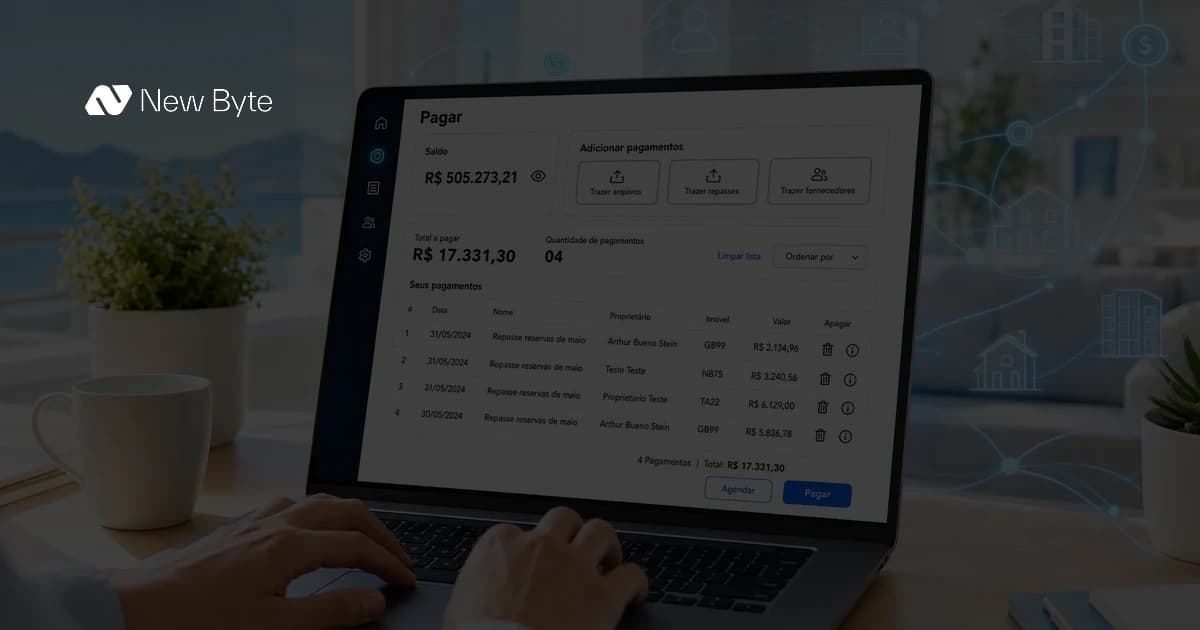
The flow starts with the payout already calculated in Stays. The manager clicks "Bring payouts" in NPay and the values appear organized by property, with the beneficiary's bank details, the deducted commission, and the net amount to transfer. The review is by property, not by spreadsheet. With a few clicks, all monthly payouts go to Asaas and are sent via Pix or wire transfer.
The imported data cannot be edited within NPay, by design. If there's an error in a value or bank detail, the correction happens in Stays. This protects the integrity of what was calculated and eliminates divergence between systems.
2. Supplier payments
Cleaning, maintenance, contractors. The same payout flow applies to suppliers: posting in Stays, importing into NPay, batch processing through Asaas. Instead of 12 individual transfers to the cleaning team at month-end, one operation resolves them all. And every supplier gets paid the same day.
3. Invoice issuance
For many managers, invoices are the most painful bottleneck of the month. NPay imports the reservations for the period, automatically calculates the value of each invoice based on the configured commissions and fees, and separates them by property to ease review. The manager checks, approves, and Asaas electronically transmits the invoice. What used to be an entire day of work with an external system, control spreadsheet, and manual validation becomes a single, auditable workflow.
4. Guest billing
When a guest has a pending balance (a pet fee not charged at booking, a late check-out penalty, equipment damage), NPay pulls the reservation data, generates an Asaas payment link, and the manager sends it via WhatsApp. The guest pays via Pix or credit card, and NPay automatically registers the payment in the reservation inside the PMS. No forgotten billing, no parallel spreadsheet tracking who still owes.
How it works in practice
NPay's end-to-end cycle always passes through three layers:
- Stays calculates: the manager's financial cycle is configured in the PMS (payout dates, commissions, fees, deductions)
- NPay imports and organizes: the manager decides when to pull payouts, invoices, or supplier payments into NPay; the import brings everything organized by property or supplier
- Asaas executes: transfers, invoice transmission, and billing are processed by Asaas, with real-time status
| Status in NPay | What it means |
|---|---|
| Processing | Sent to Asaas, awaiting processing |
| Pending | Awaiting approval or execution |
| Completed | Successfully executed |
| Canceled | Canceled by the manager or by the system |
| Error | Processing failure, check data or balance |
Status is visible per operation, replacing the "check on the phone" routine many managers still keep after each payment.
Security and operator control
Every payment operation in NPay requires PIN authentication. Transfers may require a second approval via SMS or the Asaas app, depending on volume. Payments can be scheduled for future dates (useful for wrapping everything up on Friday and letting it process on Monday), and Asaas executes them automatically on the scheduled date.
There is also fee transparency: each operation summary shows the payment value, the NPay fee, the Asaas fee, and the final consolidated amount. Pix QR Code, for example, costs R$ 0.89 per transaction. No surprises on the statement.
What changes in the routine
The biggest shift is not "making payments faster", it's no longer treating month-end as an event. There is no more "invoice day", "payout day", or "pending billing day". Everything flows through the same routine, throughout the week, without blocking entire days on the calendar.
For the manager going through a growth moment (scaling from 30 to 80 properties, for example), NPay is what holds the operation together without requiring an extra hire in the finance area. The variable cost that would go to another human role becomes internalized in the workflow. More revenue, less spreadsheet.
At Achei Gramado's operation, based in Gramado/RS, Saviani and Erones share how they moved from a three-day process to a more automated and secure workflow:
No setup required, aligned with your plan
NPay works automatically from the already-integrated Stays. There is no additional setup, no manual import, and no panel to fill in. It's worth checking with your New Byte team whether your plan covers all the fronts (owner payouts, supplier payments, invoices, and guest billing), as the features are organized according to your plan.
The difference that doesn't show up in competitors' marketing
Most vacation rental systems stop at guest support. Finance is left out, and the manager keeps a parallel spreadsheet, the bank open in another tab, and manual tracking of who paid. NPay pulls that part into the same ecosystem that already handles communication, check-in, and AI training. The financial cycle no longer lives apart from the operation.
See your monthly payouts in NPay.